In this post:
By Emily Brown • August 28, 2026
Optimise Your Instagram Profile and Get More Traffic to Your Allied Health Practice
How to Grow Your Allied Health Practice by Optimising Your Instagram Profile
If you’ve ever searched for a local service or business on Instagram, it’s probably because you have in mind a thing you’re looking for. As for who can provide that thing, well—you might try the first decent-looking account that can quickly confirm a few key pieces of info: who they are, where they are, what they offer, and whether this is relevant for you.
If you’re a solo practitioner or a practice team leader, chances are you’ve got an Instagram account that you wish did more without you having to invest as much time on it.
There are a few surprisingly simple profile optimisations that can make a world of difference to your Instagram discoverability and help turn you into that first-pick profile on Instagram. In today’s article, we’re looking at a handful of quick optimisations you can implement yourself in less than fifteen minutes to solve common visibility blockages.
Online Discoverability and How It Helps Grow Your Practice on Instagram
I usually describe Discoverability to my clients as: how easy it is for your practice to be found when potential clients are searching for the services you offer.
Instagram is its own kind of social media search engine (a bit like Google search). When viewers are looking for health services in your area of expertise, they receive ranked results based on how relevant a profile or its content is to their search query.
Unfortunately, many practitioners don’t realise that just because they offer a specific service in specific area (eg. ‘Psychology Services in Townsville’), this doesn’t mean their account will appear when searchers type that exact query. An unoptimised profile that doesn’t appear even though it should be relevant is a common discoverability blockage that stops traffic ever reaching your Instagram page.
The good news it, there's a few quick fixes for improving traffic flow to your Instagram profile:
Instagram Profile Optimisation Guide for Health Professionals
1. Switch to a Professional Account and Add a Category Label
If you haven’t already done this, start here! A Professional Account type ensures your profile is publicly discoverable and allows your content to appear in Instagram’s search engine.
Using a Personal Account is a common problem that some practitioners don’t realise can block discoverability, but there’s an easy fix. Here’s how to check, and make the switch:
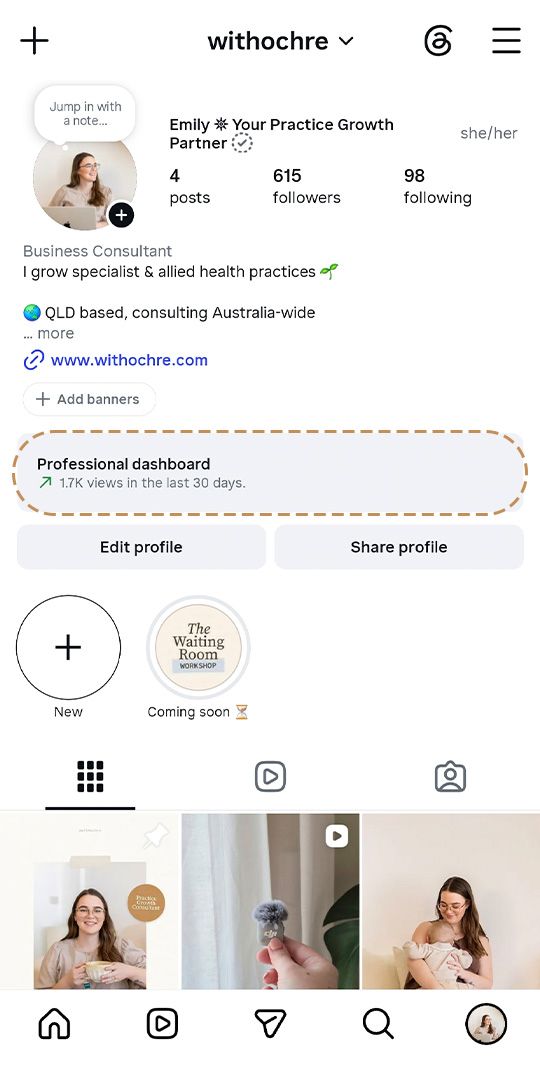
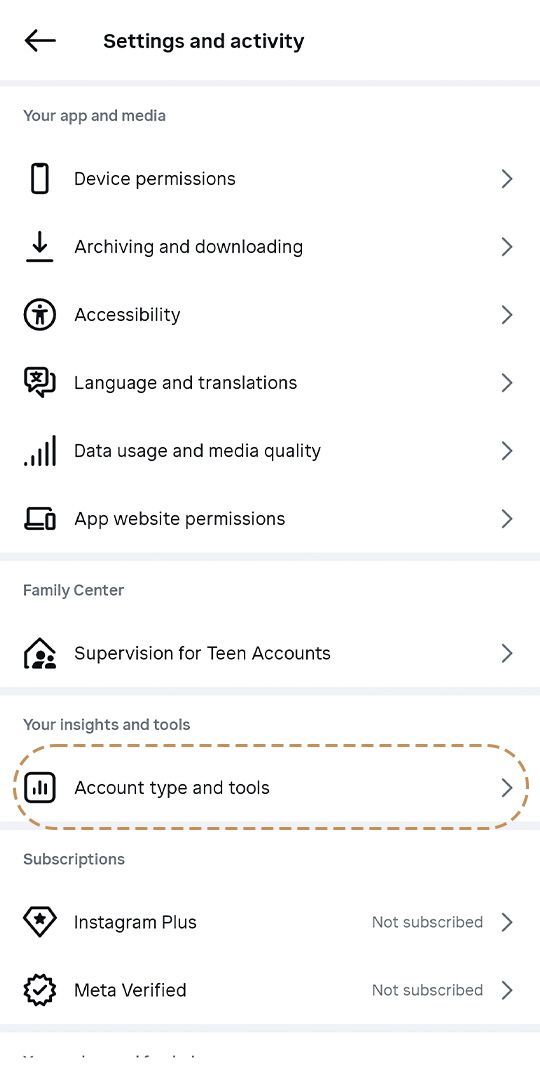
If your Instagram profile is already switched to a professional account, you’ll have this Professional Dashboard access (1) above your Edit and Share Profile buttons. You can also check by accessing the hamburger menu in the top right corner of the profile screen and tapping ‘Account type and tools’ (2)—your account type should appear at the top (3).
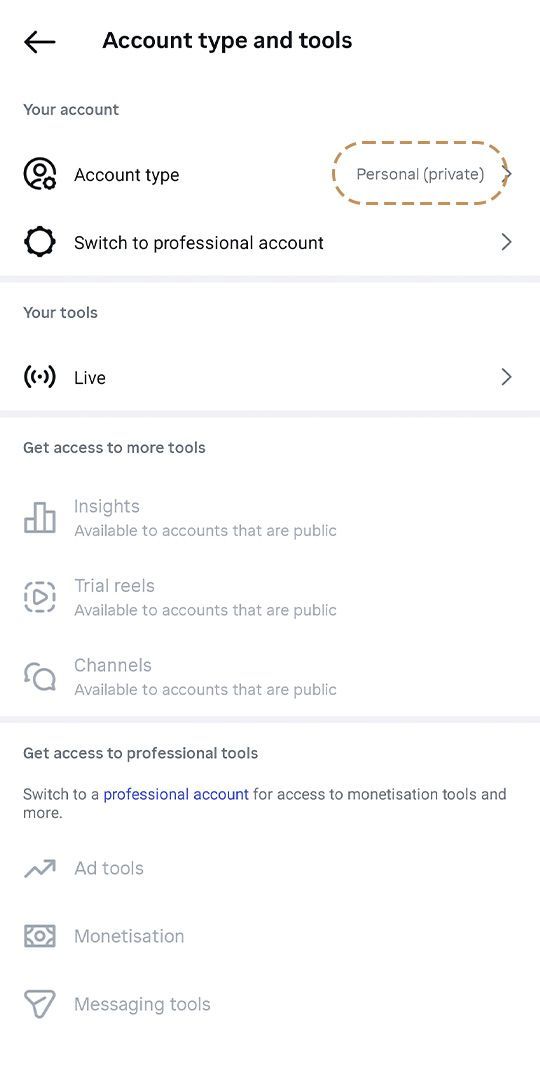
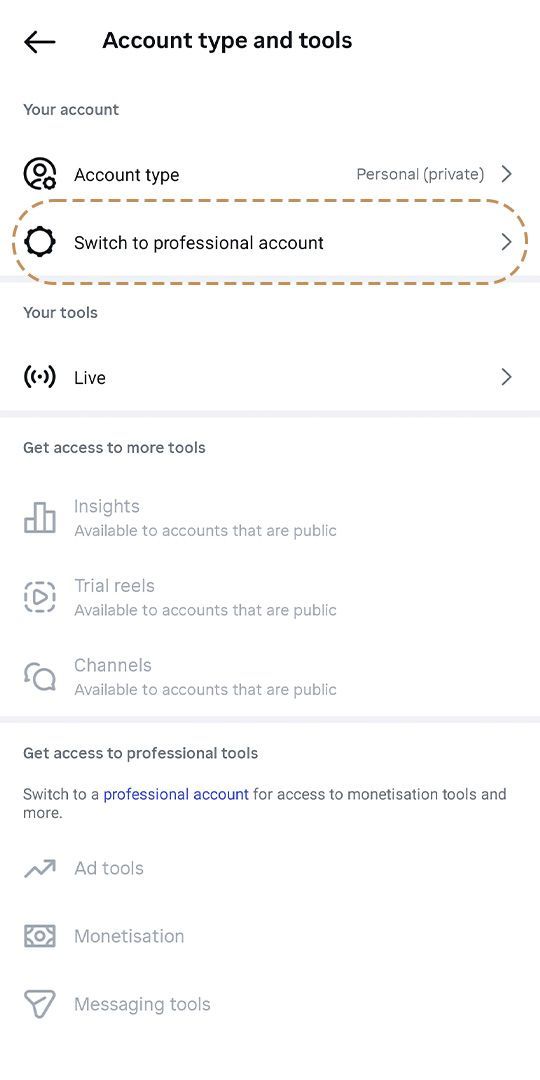
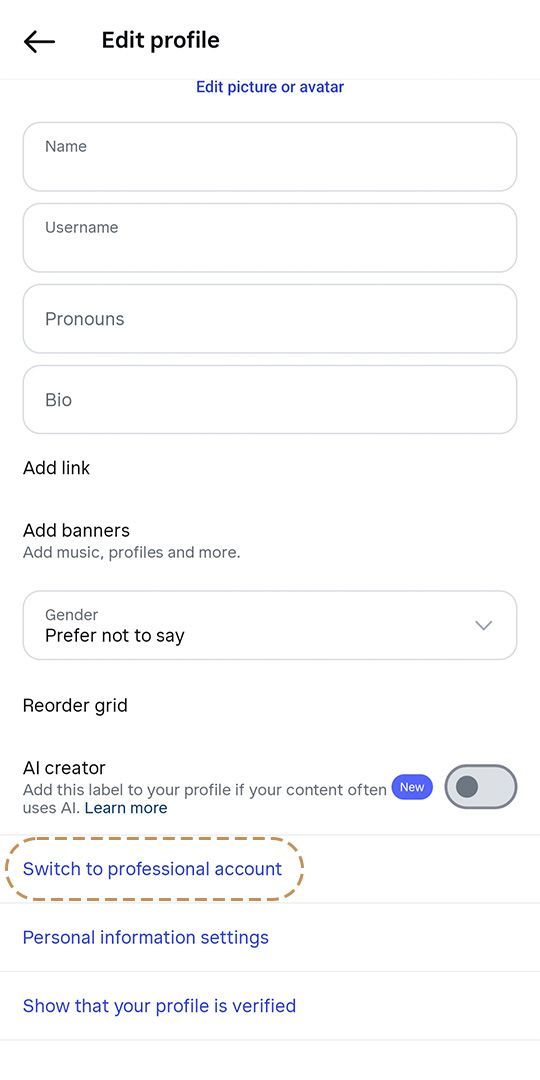
To switch to a professional account, either tap ‘Switch to a professional account’ in the ‘Account type and tools’ menu (1), or tap the Edit Profile button from your profile, scroll to the bottom of the screen and tap the ‘Switch to a professional account’ text (2).
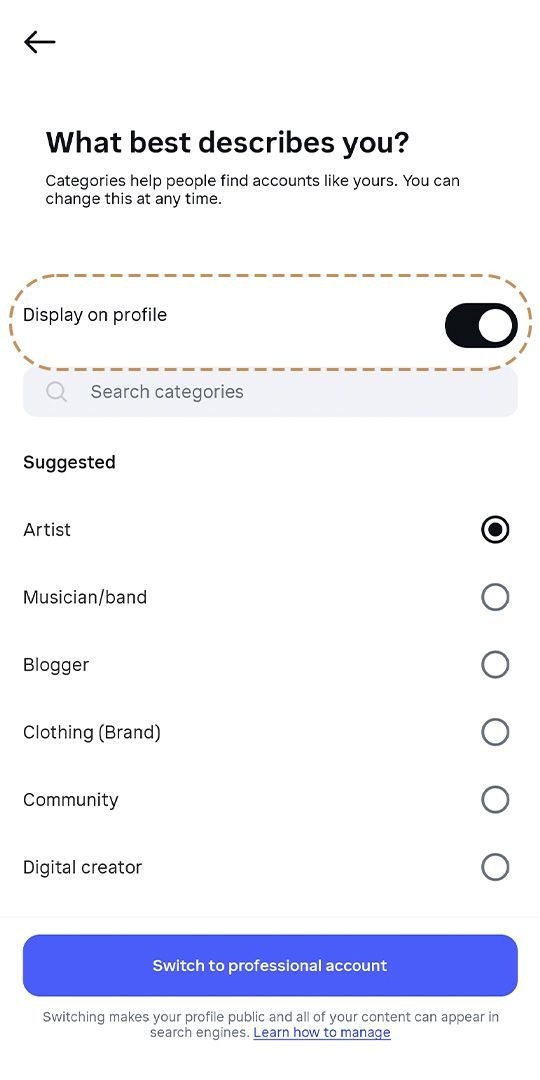
Follow the prompts, then you’ll need to select a Category Label (think of it like a job title). Try and get as close as you can here, and make sure to toggle on the ‘Display on profile’ option (1) once you select your category.
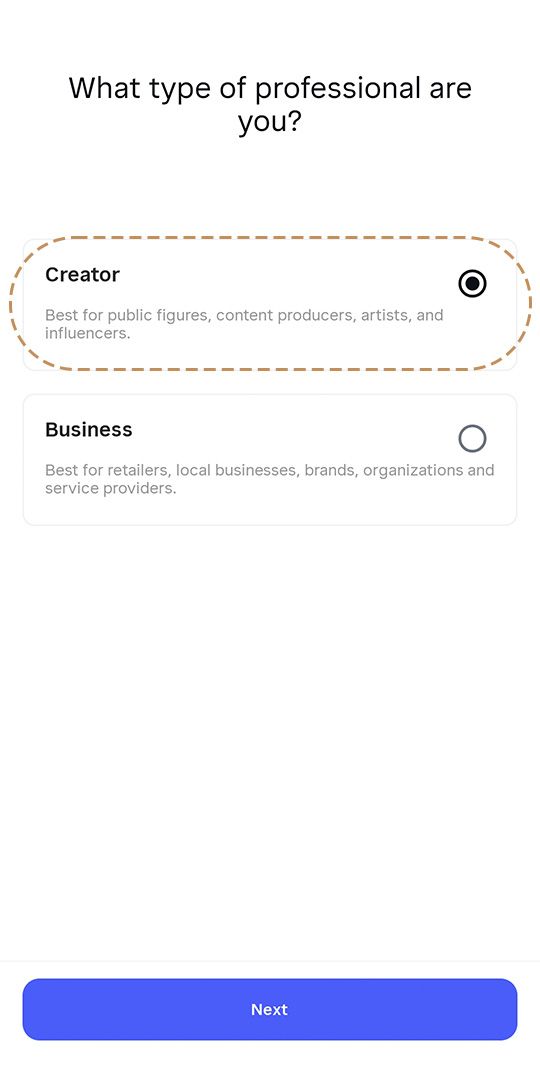
Next, you’ll be asked to choose a Business or Creator account (2). I’ve included a section in this post about the difference between the two, but
I recommend Creator in most instances.
2. Optimise Your Instagram Account Username
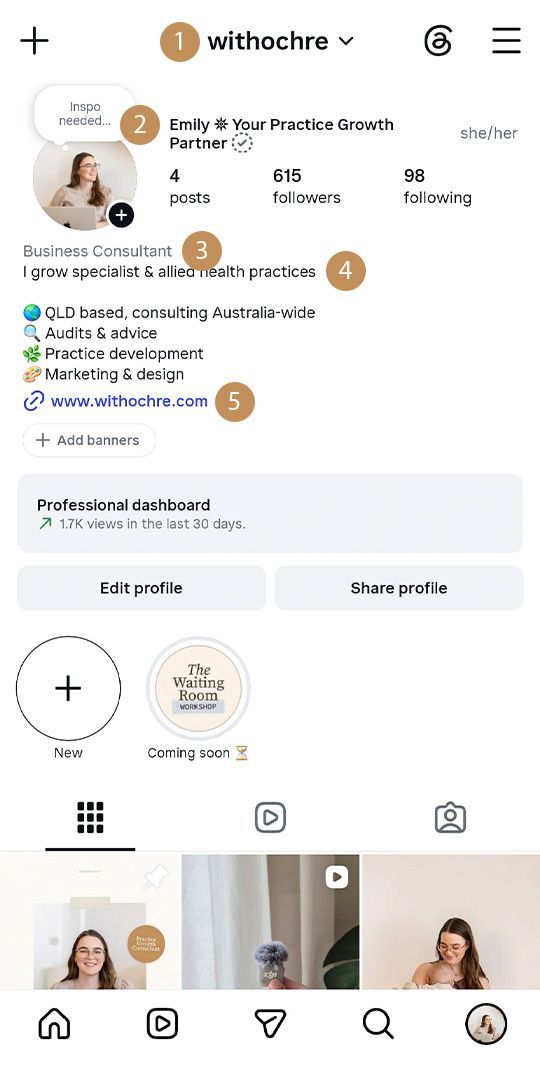
Your Instagram username (I call it a handle) can be the first touchpoint with a potential client browsing Instagram, and including a simple keyword like your service type or location is a great way to improve discoverability of your practice in search results.
A business name is usually most ideal to use as your Instagram handle since they often contain a relevant keyword, for example @mybusinesspsychology.
If you’re a solo practitioner using a format like
@yourname, try adding a keyword like
@yournamepsychologist,
@yournamephysio or something similar that points to your area of expertise.
If it’s unrealistic for you to fit a keyword in your Instagram handle because it gets too long or complicated (who even knows how to spell Occupational Therapy, anyway?)—don’t worry, those longer ones can still be useful somewhere else.
3. Optimise Your Name Field
The Name Field is the line that appears directly under the username on your Instagram profile.
When using the search function, the Name Field text appears beneath your username in search results, and when users scroll the feed and are recommended accounts to follow.
Make sure your name field contains a short but specific description: include keywords where possible, or any that were unavailable to use in your handle.
Steer away from putting only a name or job title. Ideally, your job title already appears as a Category Label when you switch to a professional account, and your name on its own could do more for discoverability.
Use special areas of interest that double as discoverability markers (pair your name with these or use on their own)—key words or phrases like ‘paediatric’ for a children’s OT, ‘motivation and life coach’ for a psychologist, or ‘practice growth partner’ for an allied health practice consultant (that’s mine!) provide a little more specificity than your username alone.
4. Optimise Your Bio
Your Instagram bio is next on the list! You get 150 characters, and I like to use as many as I can.
With your Category Label and Name Field optimised, you've already told viewers who you are and what you do in simple terms—your bio is the place to list your location and get more specific about your services.
My own bio includes a short transformation statement, my location and a brief service list. This is a good example of how to include keywords without stuffing for the sake of it or overwhelming the reader.
Another thing I like to do (if I have space) is place a call-to-action on the last line. Something as simple as ‘Book an appointment’ directly before your website link tells the viewer exactly what to do next, so they know what to expect or look for by clicking.
Lastly, even if you’re an online practitioner, it’s still helpful to list a location—even something like ‘Townsville-based, Australia-wide service’ makes you instantly relevant to a wider audience in search results.
5. Add a Link
Adding a link is a great opportunity to prompt viewers to take the next step to becoming clients.
Even if you don’t have a website, add a direct link to your booking calendar—the easier it is for potential clients to get what they need from your Instagram profile, the better your results will be.
To do this, tap the Edit Profile button, select the ‘Add link’ option and paste the URL for your website or calendar.
Don’t worry about including more than one link to start with, just pick the one that best prompts the action you want viewers to take next.
6. (Bonus tip) Add an Action Button
The Action Button allows you to add a ‘Book Now’ button to your Instagram profile—unfortunately it’s not a direct URL link, and only pairs with a handful of softwares which most practitioners probably aren’t using.
However, if you
are using Acuity Scheduling, Fresha, Vargaro or Setmore (these are the more common ones, but it’s a good idea to check if yours is included in the list) then go right ahead and link that up if you can.
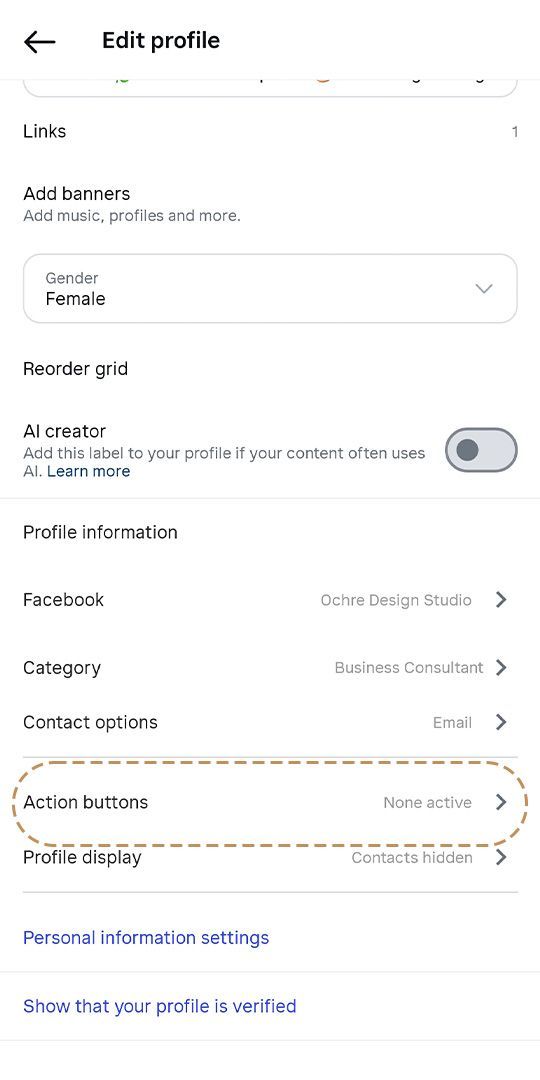
To do this, tap the Edit Profile button and select the ‘Action buttons’ option (1).
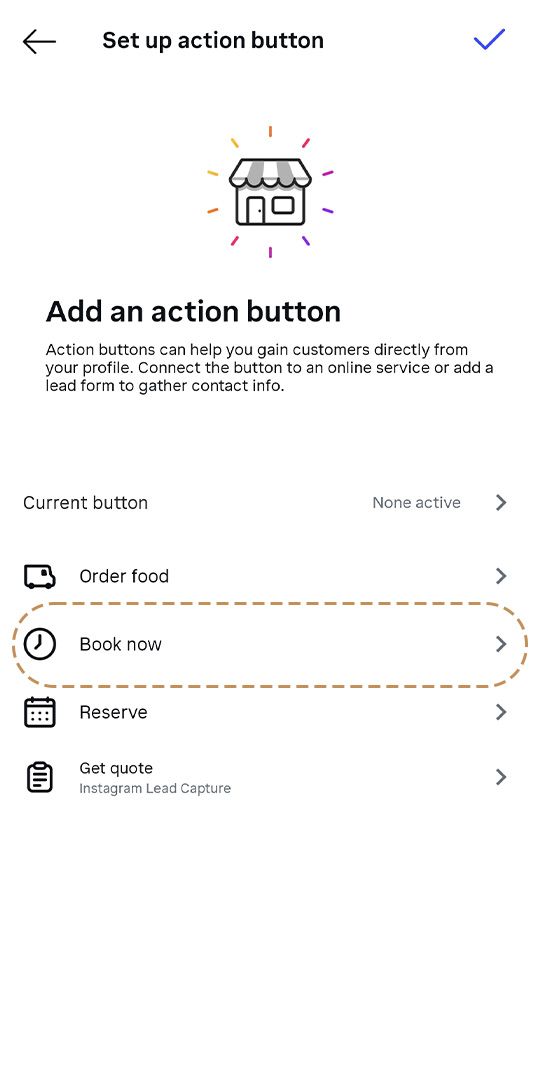
Follow the prompts to activate a button and link your booking software (2).
Should I Choose a Business or Creator Account for my Health Practice on Instagram?
I’d recommend a Creator Account for the simple reason that you’ll have access to mainstream music and audio for use in Reels, Stories and Posts, which makes content creation easier. Business Accounts only allow use of audio that includes copyright licensing (for sale of products), so options are limited.
Both account types offer Action Buttons and analytics tools to track profile and content metrics, but most solo/small/medium-sized health practices are not likely to use any of the advanced tools that significantly differentiate the two account types.
Business Accounts are better suited to larger-scale eCommerce brands who sell physical products, pay for lots of advertising and directly connect third-party marketing softwares—not usually things that are essential for us. Unless you’re determined to have a clickable address in your profile that opens the Maps app on a users’ phone, which is about the only notable feature difference at this level (note you could always include an address in your bio) I’d choose Creator.
Next Steps to Improve Traffic to Your Health Practice Using Instagram
Once you’ve applied the optimisation steps in this article, you’ve already resolved most of the common issues that cause discoverability blockages for health practices on Instagram.
The next step to improve your Instagram traffic is to optimise the actual content you’re posting, so I created a handy Instagram Post Checklist for Health Professionals to help you do just that.
I hope this article helps you on your practice growth journey!
—Emily

*No AI was used in the authorship of this blog post.

About the author
Emily spends her days building better practices for specialists, allied health and wellness professionals.
Her unique combined experience of the health and marketing industries make her a great fit for solo practitioners or small teams who want to grow their client base and do more in less time.
Emily is a strategic schemer who loves organising, creating systems and drinking tea at eyebrow-raisingly scalding temperatures while she does it all.